
After a night out at the pub with friends, we ended up playing a game of darts called Killer. It's a great game, chaotic, social, and surprisingly strategic. But keeping score on a piece of paper or on someone's phone notes app is a mess. Someone always loses track, someone else disputes a point, and half the group can't even see the score.
On the walk home I thought: this needs a proper live scoreboard. Something where one person updates the score and every phone at the table refreshes automatically. A weekend project was born.
The result is dart-killer.eu — a free, no-account-needed, multiplayer Killer scoreboard. Scan a QR code and everyone at the table is watching the same live board.

The Game, Briefly
For those who haven't played: each player throws with their non-dominant hand to claim a number (1–20). Once you've collected 3 points on your number, you become a Killer. Killers score points by hitting other players' numbers, but if a Killer hits their own number, they lose points. Drop below zero and you're eliminated. Last one standing wins.
The scoring logic is simple but has enough edge cases (what if the second-to-last player gets eliminated by accident?) that it deserves proper code rather than a napkin.
The Stack
I wanted to use this as a playground for some Symfony features I hadn't used together yet:
- Symfony 8 / PHP 8.5
- Twig Components + Live Components (Symfony UX)
- Mercure + Turbo Streams for real-time cross-device sync
- FrankenPHP (worker mode in production)
- Symfony AssetMapper — no Webpack, no bundler
- PostgreSQL for persistence
- EasyAdmin 5 for a minimal admin panel
- Justfile for task automation
- Docker multi-stage builds, deployed via Dokploy
The Data Model
The game progresses through four statuses managed by a GameStatus enum:
enum GameStatus: string
{
    case Setup = 'setup';
    case NumberAssignment = 'number_assignment';
    case Active = 'active';
    case Finished = 'finished';
}
The two main entities are Game (UUID v7 primary key, status, timestamps) and GamePlayer (UUID v7, name, assigned number, points, eliminated flag, turn order).
The key decision was to not store isKiller in the database. It's purely computed:
public function isKiller(): bool
{
    return $this->points === self::MAX_POINTS && !$this->isEliminated;
}
Point management lives directly on the entity and enforces the game rules as invariants:
public function addPoint(): void
{
    if ($this->isEliminated || $this->points >= self::MAX_POINTS) {
        return;
    }
    $this->points++;
}

public function removePoint(): void
{
    if ($this->isEliminated) {
        return;
    }
    $this->points--;
    if ($this->points < self::MIN_POINTS) {
        $this->isEliminated = true;
    }
}
This way, no controller or service can accidentally put a player in an invalid state.
Routing as a State Machine
GameController acts as a state machine enforcer. Every route checks the game's current status and redirects to the correct screen if something is off:
private function redirectToStatus(Game $game): RedirectResponse
{
    return $this->redirect(match ($game->getStatus()) {
        GameStatus::Setup            => $this->generateUrl('app_game_setup', ['id' => $game->getId()]),
        GameStatus::NumberAssignment => $this->generateUrl('app_game_assign', ['id' => $game->getId()]),
        GameStatus::Active           => $this->generateUrl('app_game_play', ['id' => $game->getId()]),
        GameStatus::Finished         => $this->generateUrl('app_game_winner', ['id' => $game->getId()]),
    });
}
If you try to open the play page while the game is still in setup, you land back on the setup screen. No invalid states possible from a bad URL.
The Dartboard as a Pure PHP SVG Generator
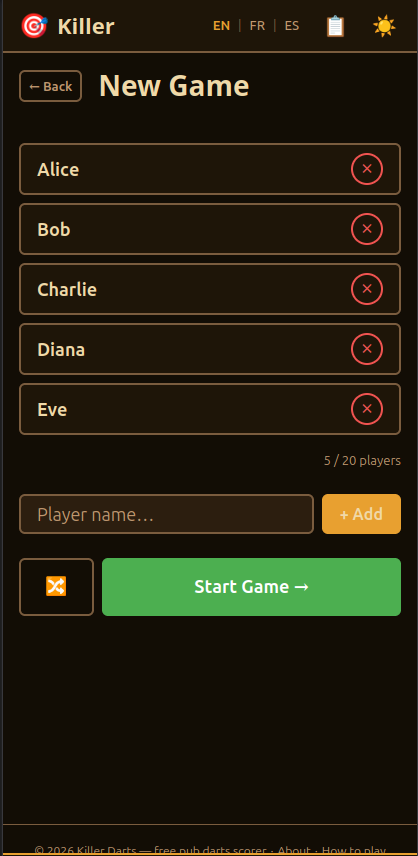
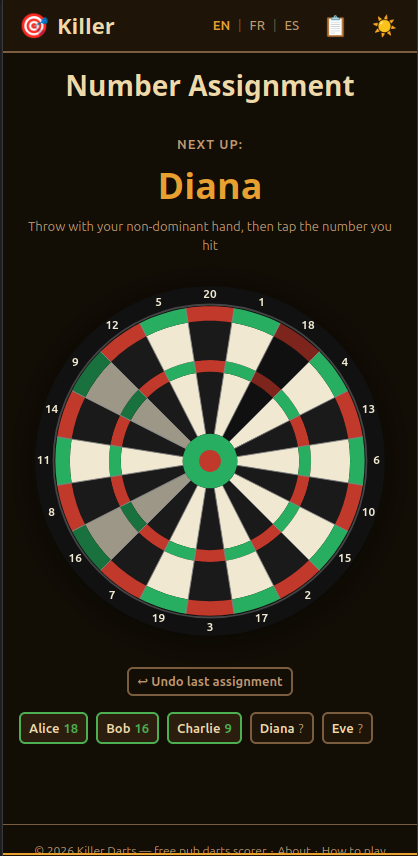
One of the more fun parts of this project was building the dartboard. I didn't want to use a static SVG file or an external library. I wanted it generated dynamically so it could react to game state: show player names on segments, highlight killers, mark taken numbers.
DartboardComponent is a Twig Component (server-side only, no live updates) that generates all SVG arc paths mathematically in PHP. I'll be honest, the arc math was Claude's doing. I knew what I wanted — a real dartboard geometry with the correct segment order, ring radii, and polar-to-SVG coordinate conversion — but that's the kind of thing where you'd rather describe what you need and let an AI generate the formula than do it yourself at 11pm on a Saturday.
#[AsTwigComponent('Dartboard')]
class DartboardComponent
{
    private const SEGMENT_ORDER = [20, 1, 18, 4, 13, 6, 10, 15, 2, 17, 3, 19, 7, 16, 8, 11, 14, 9, 12, 5];

    private const R_BULL         = 12.5;
    private const R_BULL_25      = 25.0;
    private const R_INNER        = 100.0;
    private const R_TRIPLE_IN    = 107.0;
    private const R_TRIPLE_OUT   = 115.0;
    private const R_OUTER        = 162.0;
    private const R_DOUBLE_IN    = 170.0;
    private const R_DOUBLE_OUT   = 178.0;
    private const R_LABEL        = 195.0;
    private const R_PLAYER_LABEL = 130.0;

    private function arc(float $r1, float $r2, float $startDeg, float $endDeg): string
    {
        // converts polar coordinates to SVG arc path (M ... L ... A ... L ... A ... Z)
        $cx = 200; $cy = 200; // centre of the 400x400 viewBox
        // ... arc math ...
    }
}
The getSegments() method returns all arc paths for every ring (inner single, triple, outer single, double) plus the label position coordinates inside each segment.
The same component serves two roles depending on the interactive prop:
- Assignment screen (
interactive: true): each segment becomes a clickable hit zone wired to a Live Component action:
{% if interactive %}
    <path class="dartboard__hit-zone {{ seg.number in takenNumbers ? '--taken' }}"
          d="{{ seg.fullPath }}"
          data-action="click->live#action"
          data-live-action-param="assignNumber"
          data-live-number-param="{{ seg.number }}"
    />
{% endif %}- Game screen (
interactive: false): player names and the killer emoji are overlaid as<text>elements at the position computed for each segment.

Live Components: Interaction on a Single Device
Symfony UX Live Components handle the per-device interactivity. The two key components are GameAssignComponent and GameBoardComponent.
GameAssignComponent
On the number assignment screen, this Live Component wraps the dartboard. When a player taps a segment, the Stimulus action fires an AJAX request to the assignNumber live action:
#[AsLiveComponent('GameAssign')]
class GameAssignComponent
{
    use DefaultActionTrait;

    public string $gameId;

    #[LiveAction]
    public function assignNumber(#[LiveArg] int $number): void
    {
        $game = $this->gameRepository->find($this->gameId);
        $allAssigned = $this->gameService->assignNumber($game, $number);

        if ($allAssigned) {
            // optionally auto-start...
        }
    }

    #[LiveAction]
    public function undoAssignment(): void
    {
        $game = $this->gameRepository->find($this->gameId);
        $this->gameService->undoLastAssignment($game);
    }

    #[LiveAction]
    public function startGame(): Response
    {
        $game = $this->gameRepository->find($this->gameId);
        $this->gameService->startActiveGame($game);
        return new RedirectResponse($this->urlGenerator->generate('app_game_play', ['id' => $this->gameId]));
    }
}
After each action, the component re-renders server-side and the browser updates just the dartboard section. No page reload, no custom JS.
GameBoardComponent
The main scoreboard during an active game. addPoint and removePoint update the database and call publish() to broadcast to other devices (more on that below).
There's a small but important UX detail here: what happens when the last player gets eliminated? Instead of immediately calling finishGame(), the component enters a pending winner state:
#[LiveAction]
public function removePoint(#[LiveArg] string $playerId): void
{
    $game = $this->gameRepository->find($this->gameId);
    $winner = $this->gameService->removePoint($game, $playerId);

    if ($winner !== null) {
        $this->pendingWinnerId = $winner->getId()->toRfc4122();
    }

    $this->publish();
}

#[LiveAction]
public function confirmWinner(): Response
{
    $game = $this->gameRepository->find($this->gameId);
    $this->gameService->finishGame($game);
    $this->publish(gameFinished: true);
    return new RedirectResponse(/* winner page */);
}

#[LiveAction]
public function cancelWinner(): void
{
    // restore the just-eliminated player via reflection (bypass private setter)
    $this->gameService->restorePlayer($this->pendingWinnerId);
    $this->pendingWinnerId = null;
    $this->publish();
}
The re-render shows a confirmation overlay: "Are you sure X won?" with a confirm and undo button. Mis-clicks happen, especially after a few rounds.

Mercure + Turbo Streams: Cross-Device Sync
Here's the part that makes the whole thing feel like magic. Every time publish() is called on the GameBoardComponent, it renders a Turbo Stream fragment and pushes it to all connected devices via the Mercure hub:
private function publish(bool $gameFinished = false): void
{
    $html = $this->twig->render('broadcast/play.stream.html.twig', [
        'gameId'          => $this->gameId,
        'pendingWinnerId' => $this->pendingWinnerId,
        'gameFinished'    => $gameFinished,
    ]);

    $this->hub->publish(new Update('game/' . $this->gameId, $html));
}
The broadcast template wraps a full re-render of the GameBoard component in a Turbo Stream action:
{# broadcast/play.stream.html.twig #}
{% if gameFinished %}
    <turbo-stream action="replace" target="game-board-{{ gameId }}">
        <template>
            <script>window.location.href = "{{ path('app_game_winner', {id: gameId}) }}";</script>
        </template>
    </turbo-stream>
{% else %}
    <turbo-stream action="replace" target="game-board-{{ gameId }}">
        <template>
            <div id="game-board-{{ gameId }}">
                {{ component('GameBoard', { gameId: gameId, pendingWinnerId: pendingWinnerId }) }}
            </div>
        </template>
    </turbo-stream>
{% endif %}
On the play page, subscribing to the Mercure topic is a single line:
<div {{ turbo_stream_listen('game/' ~ game.id.toRfc4122())|raw }}></div>That's it. Turbo picks up the SSE stream from Mercure and whenever a new message arrives, it performs the DOM replace automatically. When the game ends, every connected device navigates to the winner page.
The split of responsibilities is clean:
- Live Component: handles the interaction on the device that tapped the button, re-renders immediately for that person.
- Mercure + Turbo Stream: broadcasts the new state to every other phone at the table.
One thing worth noting: right now, anyone who opens the game link gets full access to the controls. They can add and remove points just like the person who created the game. At the pub with friends that's fine, but it's something I want to improve with a proper host/viewer split at some point.
Docker and FrankenPHP
The app runs on FrankenPHP in worker mode in production, which boots the Symfony kernel once and keeps it alive between requests. The multi-stage Dockerfile handles both environments cleanly:
FROM dunglas/frankenphp:1.12.1-builder-php8.5.4-trixie AS base
# install PHP extensions: apcu, intl, opcache, gd, zip, pdo_pgsql

FROM base AS frankenphp_dev
RUN install-php-extensions xdebug
# install php-cs-fixer, Symfony CLI, create app user matching host UID/GID
CMD ["frankenphp", "run", "--watch"]

FROM base AS frankenphp_prod
COPY app .
RUN composer install --no-dev --optimize-autoloader \
    && composer dump-env prod \
    && php bin/console importmap:install \
    && php bin/console asset-map:compile
# assets are baked into the image, no runtime compilation needed
The docker-entrypoint.sh handles the runtime bootstrap: cache warmup and auto-migrations on every container start.
php bin/console cache:warmup
php bin/console doctrine:migrations:migrate --no-interaction --allow-no-migration
exec docker-php-entrypoint "$@"
For the Mercure hub in development, it runs as a separate container. I kept it separate from FrankenPHP's built-in Mercure capability to make the setup explicit:
# compose.yaml (excerpt)
mercure:
  image: dunglas/mercure:v0.21.11
  ports:
    - "${MERCURE_PORT:-8881}:80"
  environment:
    SERVER_NAME: ':80'
    MERCURE_PUBLISHER_JWT_KEY: '${MERCURE_JWT_SECRET}'
    MERCURE_SUBSCRIBER_JWT_KEY: '${MERCURE_JWT_SECRET}'
    MERCURE_EXTRA_DIRECTIVES: |
      cors_origins "*"
      anonymous
The Justfile
I've been using Just as a task runner on all my recent projects. It replaces the mix of Makefile targets and random shell scripts I used to have. Here's a selection of targets from this project:
# Start the full dev environment
dev:
    docker compose up -d
    @echo "App: http://localhost:${WEB_PORT:-8880}"

# Run PHP CS Fixer
cs:
    docker compose exec server php-cs-fixer fix --diff

# Run tests
test:
    docker compose -f compose.test.yaml run --rm server php bin/phpunit

# Connect to the database
db:
    docker compose exec db psql -U${POSTGRES_USER} ${POSTGRES_DB}

# Open a shell in the app container
shell:
    docker compose exec server bash

# Run a Symfony console command (usage: just console cache:clear)
console *args:
    docker compose exec server php bin/console {{args}}

# Build the production image
build:
    docker build --target frankenphp_prod -t killer:latest ./docker/php
Just keeps the cognitive overhead low. Anyone cloning the project can run just dev and be up and running, without having to read a wall of text in the README.
CI/CD: GitLab to Dokploy
The pipeline has two jobs. The first builds and pushes the production Docker image to my private registry:
build-docker-image:
  stage: build
  image: docker:27.3.1
  services:
    - docker:27.3.1-dind
  script:
    - docker login -u $CI_REGISTRY_USER -p $CI_REGISTRY_PASSWORD $CI_REGISTRY
    - docker build
        --target frankenphp_prod
        --cache-from $CI_REGISTRY/personal/killer:latest
        --build-arg GIT_SHA=$CI_COMMIT_SHA
        --build-arg GIT_SHORT_SHA=$CI_COMMIT_SHORT_SHA
        --build-arg GIT_REF=$CI_COMMIT_REF_NAME
        --build-arg BUILD_DATE=$(date -u +"%Y-%m-%dT%H:%M:%SZ")
        -t $CI_REGISTRY/personal/killer:latest
        -f docker/php/Dockerfile .
    - docker push $CI_REGISTRY/personal/killer:latest
  only:
    - master
  changes:
    - app/**/*
    - docker/**/*
The second job triggers a Dokploy redeploy via its API. No SSH, no manual pulls. Just one HTTP call:
deploy_production:
  stage: deploy
  image: curlimages/curl:8.10.1
  script:
    - |
      curl -X POST "$DOKPLOY_URL/api/application.deploy" \
        -H "x-api-key: $DOKPLOY_API_KEY" \
        -H "Content-Type: application/json" \
        -d "{\"applicationId\": \"$DOKPLOY_APP_ID\"}"
  only:
    - master
  needs:
    - build-docker-image
Dokploy picks up the new image, runs a rolling update via Docker Swarm, and the old container is only stopped once the new one is healthy. Zero downtime, and I get a Discord notification either way.
If you want to see how I set up Dokploy itself, I wrote about that here.
PWA and Offline Support
Since people use this on their phones at the pub, I added a basic PWA: a manifest.webmanifest (dark theme, portrait orientation, SVG icon) and a service worker with a cache-first strategy for static assets and network-first for everything else.
The service worker explicitly skips the Mercure SSE endpoint and the /admin route:
// sw.js (excerpt)
self.addEventListener('fetch', (event) => {
    const url = new URL(event.request.url);

    if (url.pathname.startsWith('/.well-known/mercure')) return;
    if (url.pathname.startsWith('/admin')) return;

    if (url.pathname.startsWith('/assets/')) {
        event.respondWith(cacheFirst(event.request));
    } else {
        event.respondWith(networkFirstWithOfflineFallback(event.request));
    }
});
Not mandatory for this kind of app, but it makes the install-to-home-screen experience much smoother.
Final Thoughts
What started as a "wouldn't it be nice" idea on the walk home turned into a genuinely fun weekend project. The combination of Symfony Live Components + Mercure + Turbo Streams is surprisingly powerful for this kind of use case. There's almost no custom JavaScript. Everything is driven by server-rendered HTML fragments.
It's live at dart-killer.eu. If you end up using it at your local, let me know in the comments!
Happy coding!
Dennis de Best




Comments